
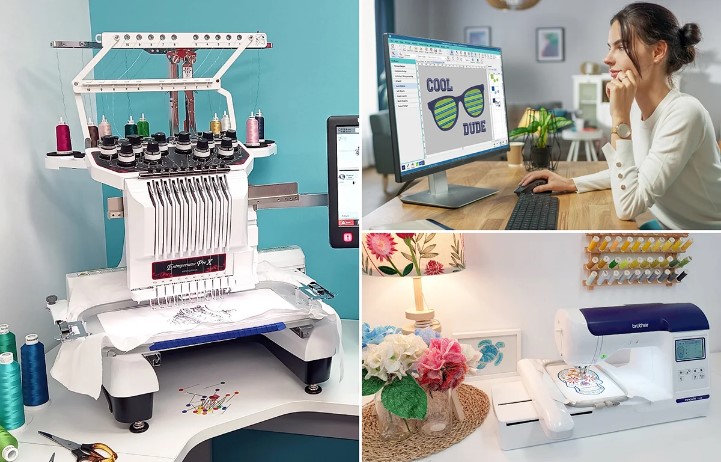
If you want clean and smooth embroidery, learning how to Convert JPG to PXF File is a must. A JPG image may look good on screen, but embroidery machines do not read pictures the same way. Machines need stitch paths, not pixels. That is why converting a JPG image into a PXF embroidery file is an important step for professional stitching results.
This guide explains everything in a simple way. You will learn what JPG and PXF files are, why conversion matters, and how to get embroidery-ready results without errors.
Understanding JPG Images in Embroidery
JPG is a common image format. It is made from pixels. Embroidery machines cannot stitch pixels. They stitch paths, angles, and directions.
Why JPG Files Are Not Embroidery-Ready
JPG files do not contain:
- Stitch direction
- Stitch length
- Needle path
- Thread order
This means a JPG must be converted before it can be stitched.
What Is a PXF File Format?
PXF is an embroidery file format used by specific embroidery systems. It stores stitch data in a way machines understand.
What Makes PXF Files Special
PXF files include:
- Exact stitch paths
- Controlled density
- Thread color changes
- Clean start and stop points
This makes them ideal for accurate embroidery.
Why Convert JPG to PXF for Embroidery
Converting JPG images to PXF files gives you control over stitching. It helps avoid mistakes and improves quality.
Benefits of JPG to PXF Conversion
- Sharp embroidery lines
- Better fabric hold
- Smooth stitch flow
- Fewer thread breaks
- Professional finish
Without proper conversion, designs can look messy or uneven.
Difference Between Auto and Manual Conversion
There are two ways to convert a JPG image to a PXF file.
Automatic Conversion
Auto tools convert images quickly.
- Fast process
- No skill needed
- Poor stitch quality
They often miss fine details.
Manual Digitizing
Manual digitizing creates stitch paths by hand.
- Clean outlines
- Balanced density
- Fabric-based settings
Manual work always produces better embroidery results.
Step-by-Step Process to Convert JPG to PXF File
Below is a simple and professional workflow.
Step 1: Prepare the JPG Image
Start with a clean image.
- High resolution
- Clear edges
- Solid colors
- No blur
A good image makes conversion easier.
Step 2: Import the Image into Embroidery Software
Open the JPG file in software that supports PXF output. Place it on the workspace.
Step 3: Clean and Edit the Artwork
Remove unnecessary details. Simplify shapes. Sharp lines convert better into stitches.
Step 4: Assign Stitch Types
Choose stitch types based on the design.
Common Stitch Types
- Satin stitch for text
- Fill stitch for large areas
- Running stitch for outlines
Each stitch type affects the final look.
Step 5: Set Stitch Direction
Stitch direction controls shine and texture. Wrong angles make designs look uneven.
Step 6: Adjust Stitch Density
Too many stitches cause stiffness. Too few causes gaps. Balance is key.
Step 7: Add Underlay Stitches
Underlay helps fabric stability. It improves shape and prevents puckering.
Step 8: Choose PXF as Output Format
Once digitizing is complete, select PXF format when saving the file.
Step 9: Test the Design
Always test stitch the file on similar fabric. Testing saves time and material.
Best Fabric Tips for PXF Embroidery
Different fabrics behave differently.
Cotton Fabric
- Medium density
- Standard underlay
Stretch Fabric
- Light density
- Strong underlay
Thick Fabric or Caps
- Firm underlay
- Strong edge stitches
Matching stitches to fabric improves results.
Common Mistakes to Avoid
Many beginners make simple mistakes during conversion.
Using Low-Quality JPG Images
Low resolution images lose detail during digitizing.
Ignoring Fabric Type
Each fabric needs custom settings.
Overcomplicated Designs
Simple designs stitch better.
Skipping Test Runs
Testing prevents costly embroidery errors.
When Professional Conversion Is Needed
You should consider professional help if your design includes:
- Small text
- Fine lines
- Detailed logos
- Large production runs
Professional digitizing ensures reliable results.
How Quality Conversion Improves Embroidery Business
Good file conversion saves money and time.
Better Machine Performance
Smooth stitches reduce machine stops.
Less Material Waste
Fewer failed designs mean less fabric loss.
Happier Customers
Clean embroidery builds trust and repeat business.
JPG to PXF Conversion for Different Uses
Logo Embroidery
Logos need clean borders and readable text.
Apparel Branding
Shirts and jackets need soft stitches.
Promotional Items
Caps and bags need strong structure.
Each use needs a slightly different approach.
Final Thoughts
Converting a JPG image into a PXF embroidery file is not just about changing formats. It is about creating clean stitch paths, correct density, and fabric-friendly designs. When done properly, the final embroidery looks sharp, smooth, and professional.
For reliable and high-quality embroidery digitizing and file conversion, digitizing buddy offers expert solutions that help transform JPG images into production-ready PXF files with confidence.